
How to find an old Bitcoin wallet: where to search, how to secure what you locate and when to bring in help
Published: Last reviewed: Editorial standards
Locating an archived Bitcoin wallet requires identifying three specific categories: associated files, backup devices, and digital recovery records. It is necessary to utilize duplicate files during the search and maintain the computing device in an offline state. Verification of current balances must be performed exclusively through publicly available addresses. Prior to attempting any repairs on locked files or compromised hardware, consult a professional specialist.
Any question on your case may be put to us here:
Begin by defining what you are searching for
Bitcoin holdings do not lapse. Coins purchased years ago remain recorded on the blockchain at their addresses. What you must actually locate is the secret that controls them. That secret may be stored in a wallet file, kept on a device, written on a printed sheet, noted as a list of words, or held behind an exchange login.
Determine which type you probably used. Ask yourself in which year you bought, where the purchase happened, and how you stored the coins. An exchange purchase points to an account. A desktop program points to a file. A small hardware device points to written recovery words. After that, collect clues.
- Email messages you received from an exchange or wallet provider, such as sign-up notices, confirmation notices and withdrawal notices.
- Records from your bank, card provider or payment service confirming that you bought Bitcoin.
- Written records such as notebooks, loose papers, printouts and photographs of handwritten notes.
- Saved logins in a password manager, stored browser credentials, and older messages with family or friends.
- A written record of each computer, phone, tablet and storage drive you used during that period.
Typical wallet categories and the records they usually leave behind
Program names, folder locations and file conventions change between versions and operating systems. As a rule, you should therefore search by file name and by keyword, not only by folder. The table records common patterns and is not a complete inventory. In practice a name alone proves little: other coins also use files called wallet.dat, and a file found under that name may be empty.
| Wallet Classification | What to check | Where it is commonly found |
|---|---|---|
| Bitcoin Core and the older Bitcoin-Qt client | The storage location might be a specific file labeled wallet.dat, or a designated directory containing it. | On several operating systems, the application’s data directory is housed within the user profile and is concealed by default settings. |
| Electrum | Wallet files that lack an apparent file extension are frequently found within a specialized wallets folder. | A folder labeled Electrum or .electrum inside the user profile |
| MultiBit | These files conclude with the .wallet or .key suffix, along with any associated backup records. | Examine the user profile for a MultiBit folder or review existing backups of that folder. |
| Web wallet account | Credentials may include a wallet ID located in older correspondence, combined with the account password. | Email inbox, password manager, or stored browser credentials |
| Wallet app on a phone | The application itself, or a recovery phrase visible in its settings | Older phones and tablets, plus their cloud or computer backups |
| Hardware wallet | A small physical device, usually accompanied by a card or sheet of recovery words | Look in drawers, safes or deposit boxes where a written backup is kept separate from the device. |
| Paper wallet | A printed page showing QR codes or long strings of characters | Storage places such as safes, deposit boxes or folders, and sometimes a printed or PDF copy |
| Account at an exchange | Confirmation emails, account statements and withdrawal notifications | Your mailbox, plus bank or card statements recording the purchase |
Where to search on drives and backups
Wallets from years past frequently remain in locations you no longer check. Begin with the folders that seem most likely, then extend the search to every backup you ever created.
Run the system search for file names like wallet.dat and for terms like bitcoin and electrum, with hidden files visible. Always search a copy of the drive, never the original.
- Old desktops, laptops and tablets stored in a cupboard, a loft or at a relative's home.
- Network storage, memory cards, USB sticks and hard drives kept outside your computer.
- Backups made by your devices or software, for example a copy of a phone, a backup drive from a Mac, or a Windows backup collection.
- Cloud storage and sync folders, along with email attachments you once mailed to yourself for safekeeping.
- Concealed program-data directories inside the user profile, where wallet applications stored their files.
- Paper kept in safes, deposit boxes, books and archived files.
Handle what you find: work on copies, keep it offline
The first rule is to safeguard the original. Before opening anything, copy each drive or file, and leave the original untouched somewhere secure. Perform all work on the copy only.
The second rule is to remain offline. While you examine the copy, disconnect the computer from the internet. Older drives may contain malware, and wallet software can begin syncing or transmitting data you did not anticipate. Avoid installing recovery tools located through a search engine or an advertisement.
If a file has been deleted, cease using that drive at once. Fresh writes may overwrite the data you need. Never run repair or undelete programs on the original drive. An exact image of the drive can first be made by a specialist.
- Never submit a wallet file, a recovery phrase or a key to any website, balance checkers included.
- Never paste recovery words or keys into a search field or a chat, even when requesting assistance.
- Maintain a simple record: what was found, where, when, and the actions you took.
- Mark every copy clearly, and store one additional copy on a separate device.
Verify balances without exposing any secret
Addresses are public by design. If you locate a list of addresses, you may check each one on a block explorer and read its balance and history. An address that holds coins confirms the coins exist. It does not confirm that you still control the keys. Perform the lookup on a device separate from the old computer, and transfer only the addresses across.
One must avoid entering a phrase or private key into any balance tool or explorer application. Should you locate recovery words in writing, restore them exclusively within the current wallet program provided by the creator on a clean device. Compare the initial address shown with an address you already recognize.
After you verify the balance is still there, transfer it to a new wallet that you create yourself and back up from scratch. Be aware that old coins sent to an exchange may raise questions about their origin, so collect your original purchase records before you move anything.
Locked, damaged or missing wallet: what each situation means in procedure
A wallet file may demand a password you no longer recall. A drive may fail to start. A file may be corrupt. These are technical matters, and every wrong attempt can reduce the chance of recovery, so proceed slowly before attempting repairs yourself. Stop and consult a specialist if any of the signs below appear.
- A drive that fails to power up, produces strange sounds, or shows error messages.
- A wallet file that requests a password you forgot, where you recall parts of it.
- Data that was erased, whether by deleting the file, wiping the disk or reformatting the drive.
- An electronic file or piece of equipment utilizing an unrecognized formatting structure.
- A substantial amount, or an old device that also serves as evidence in a dispute or an estate.
Engaging a specialist, and knowing who to steer clear of
Independent specialists are able to create an image of a damaged drive, retrieve deleted files and try likely passwords against a copy of a wallet file. A properly run engagement is defined in writing, works only on copies, leaves funds under your control and does not request your seed phrase. Charges are frequently linked to success, yet the terms vary, so review them before you agree.
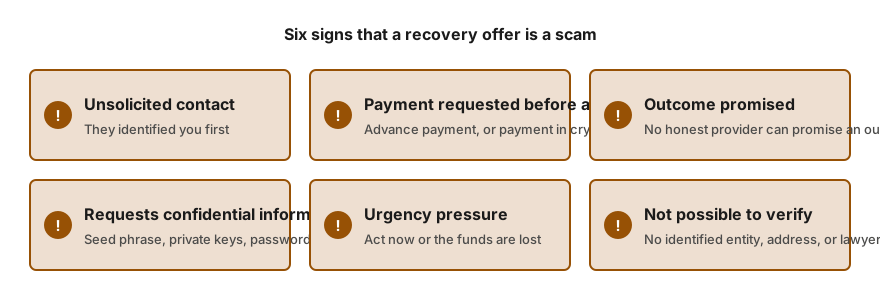
Refuse anyone who contacts you first, demands payment before examining your case, requests remote access or states that success is certain. Anyone claiming they can see your lost Bitcoin and require only a fee to unlock it is running a scam.
We can help you establish what you hold, confirm in writing whether a route appears realistic and, if it does, coordinate independent specialists. Our assessment is free of charge. Fees are discussed only once we have told you whether assistance is possible. We cannot undertake to locate a wallet or open one, and we never request your seed phrase, private keys or passwords.
Frequently asked questions
Does my Bitcoin remain on the blockchain after many years?
Coins do not expire. They remain at their addresses for as long as the network operates. What may be lost is your access, if the file, the device or the written record cannot be found. In practice, the question is whether you can still locate the secret that controls the coins.
How do I view the balance held at an old address?
Enter the public address into a block explorer. Because addresses are public, this is safe to do. A balance checker never requires a seed phrase or a private key, so decline any that does. A balance confirms that coins exist, not that you are able to spend them.
Is a file called wallet.dat always a Bitcoin wallet?
Not necessarily. Several other coins share this file name, and the wallet it belongs to may contain nothing, or only minor leftover amounts. In practice the file is a starting point, not proof. Store a duplicate somewhere safe, and arrange for a person with relevant experience to review that duplicate before you reach any conclusion.
If I reinstall the old wallet software, can I use it to open that file?
That is possible, but do it on a copy, while offline, and only with software downloaded from the maker's official site. Some programs modify a wallet file the moment they open it. For that reason you preserve the untouched original somewhere safe.
Would a data recovery shop be the right place for the old computer?
First ask, in writing, what they intend to do with the drive and the data. Request a written scope of work, ask them to operate on an image rather than the original, and never hand over passwords or a seed phrase. A shop that understands wallets will accept these conditions without objection.
How we can help
- Recovering a wallet password or file. Forgotten password or damaged wallet file: screened independent specialists attempt recovery.
- Hardware Wallet Recovery Assistance. Lost PIN or lost hardware wallet: clear options and vetted independent laboratories.
- Help with crypto inheritance and lost account access. Lawful routes to recover a deceased or incapacitated person's crypto, via lawyers and specialists.
- Source of funds and wealth documentation packs. Build a clear source of funds and source of wealth pack for exchanges, banks and processors.
The content on this page is general in nature and is not legal advice.